Hello, I am struggling to get the serial monitor to work. I have followed the instructions from other people with this issue and installed Zadig. It works in one file but I am trying to use it with the trill and Daisy together and it is not working in that file. Do i have to update the driver with zadig every time I make a change or change the file I am working on?
here is the file it works on
// Title: oscillator

// Description: Control a sine wave freq with a knob

// Hardware: Daisy Seed

// Author: Ben Sergentanis

// Breadboard

// https://raw.githubusercontent.com/electro-smith/DaisyExamples/master/seed/Osc/resources/Osc_bb.png

// Schematic:

// https://raw.githubusercontent.com/electro-smith/DaisyExamples/master/seed/Osc/resources/Osc_schem.png


#include "DaisyDuino.h"


DaisyHardware hw;


size_t num_channels;


static Oscillator osc;


float pitchknob;


void MyCallback(float **in, float **out, size_t size) {

  // Convert Pitchknob MIDI Note Number to frequency

  osc.SetFreq(mtof(pitchknob));

  for (size_t i = 0; i < size; i++) {

    float sig = osc.Process();


    for (size_t chn = 0; chn < num_channels; chn++) {

      out[chn][i] = sig;

    }

  }

}


void setup() {

  Serial.begin(9600);

  float sample_rate;

  // Initialize for Daisy pod at 48kHz

  hw = DAISY.init(DAISY_SEED, AUDIO_SR_48K);

  num_channels = hw.num_channels;

  sample_rate = DAISY.get_samplerate();


  osc.Init(sample_rate);

  osc.SetFreq(440);

  osc.SetAmp(0.5);

  osc.SetWaveform(osc.WAVE_TRI);


  DAISY.begin(MyCallback);

}


void loop() { pitchknob = 24.0 + ((analogRead(A0) / 1023.0) * 60.0);

Serial.println("woooh I'm alive");}
and this one it does not work.
// Title: oscillator

// Description: Control a sine wave freq with a knob

// Hardware: Daisy Seed

// Author: Ben Sergentanis

// Breadboard

// https://raw.githubusercontent.com/electro-smith/DaisyExamples/master/seed/Osc/resources/Osc_bb.png

// Schematic:

// https://raw.githubusercontent.com/electro-smith/DaisyExamples/master/seed/Osc/resources/Osc_schem.png


#include "DaisyDuino.h"


#include <Trill.h>


Trill trillSensor;

boolean touchActive = false;


DaisyHardware hw;


size_t num_channels;


static Oscillator osc;


float pitchknob;


void MyCallback(float **in, float **out, size_t size) {

  // Convert Pitchknob MIDI Note Number to frequency

  osc.SetFreq(mtof(pitchknob));

  for (size_t i = 0; i < size; i++) {

    float sig = osc.Process();


    for (size_t chn = 0; chn < num_channels; chn++) {

      out[chn][i] = sig;

    }

  }

}


void setup() {

  float sample_rate;

  // Initialize for Daisy pod at 48kHz

  hw = DAISY.init(DAISY_SEED, AUDIO_SR_48K);

  num_channels = hw.num_channels;

  sample_rate = DAISY.get_samplerate();


    // Initialise serial and touch sensor

  Serial.begin(9600);

  int ret = trillSensor.setup(Trill::TRILL_HEX);

  if(ret != 0) {

    Serial.println("failed to initialise trillSensor");

    Serial.print("Error code: ");

    Serial.println(ret);

  }

  Serial.println("hi I'm on");


  osc.Init(sample_rate);

  osc.SetFreq(440);

  osc.SetAmp(0.5);

  osc.SetWaveform(osc.WAVE_SIN);


  DAISY.begin(MyCallback);

}


void loop() { pitchknob = 24.0 + ((analogRead(A0) / 1023.0) * 60.0);


// Read 20 times per second

  delay(50);

  trillSensor.read();


  if(trillSensor.getNumTouches() > 0) {

    Serial.print(trillSensor.getNumTouches());

    Serial.print(" ");

    Serial.print(trillSensor.getNumHorizontalTouches());

    Serial.print(" ");


    for(int i = 0; i < trillSensor.getNumTouches(); i++) {

        Serial.print(trillSensor.touchLocation(i));

        Serial.print(" ");

        Serial.print(trillSensor.touchSize(i));

        Serial.print(" ");

    }

    for(int i = 0; i < trillSensor.getNumHorizontalTouches(); i++) {

        Serial.print(trillSensor.touchHorizontalLocation(i));

        Serial.print(" ");

        Serial.print(trillSensor.touchHorizontalSize(i));

        Serial.print(" ");

    }


    Serial.println("");

    touchActive = true;

  }

  else if(touchActive) {

    // Print a single line when touch goes off

    Serial.println("0 0");

    touchActive = false;

  }


 }
I am tearing my hair out here. I would love any advice. I have been troubleshooting this for weeks now. it should be such a simple thing to do.
here is what i see in regards to the serial monitor


There are no errors just nothing happens.
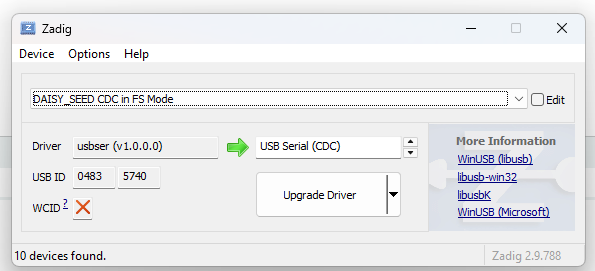
as per the advice on the other discussion this is what i have zadig driver as in FS mode
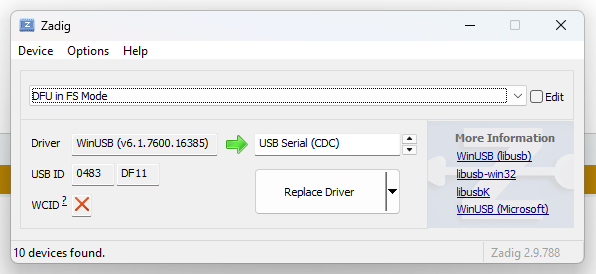
and in DFU
Thanks