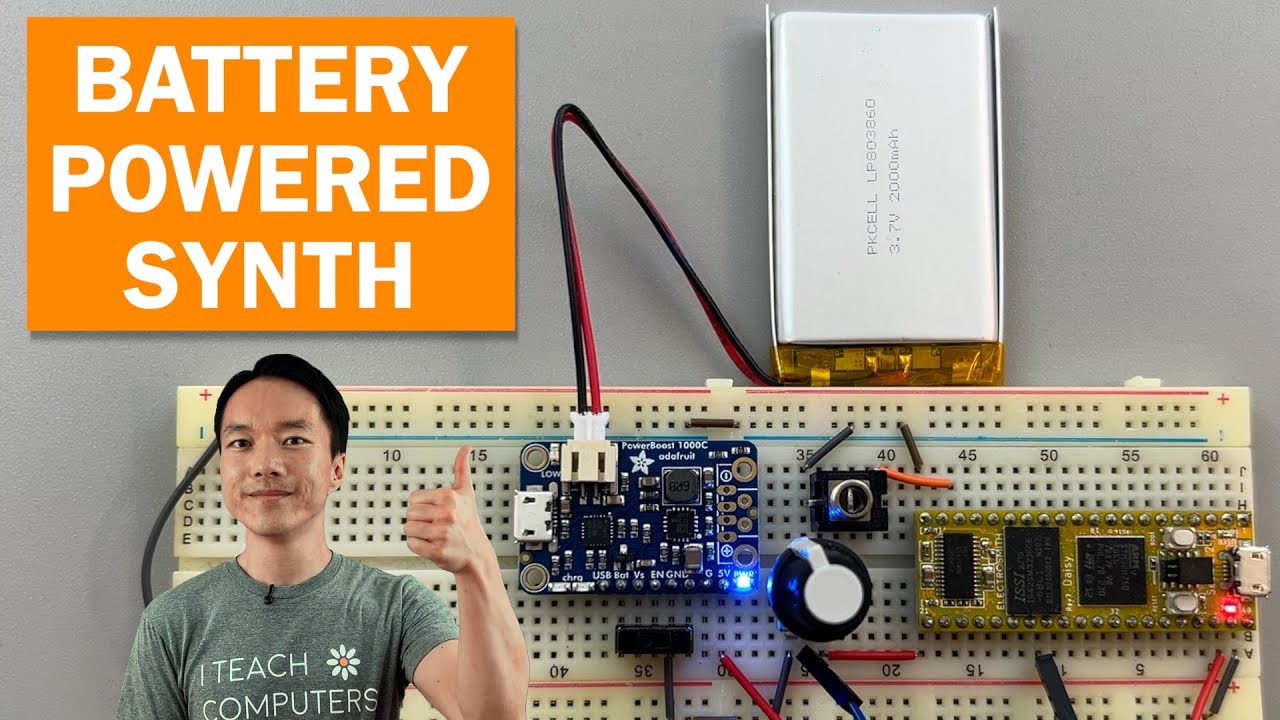
I followed all the steps in this tutorial.
A few days ago, I (accidentally) removed the switch connected to the power boost while it was off (but the battery was connected), and then it turned on.
The power boost wasn’t connected to the daisy seed when I did this.
However, now, when powered by it and not by the computer, there’s a lot of noise when playing audio. Could this be the cause? Or are there other causes?
I don’t think removing the switch will cause any issue since it’s an optional component. But maybe removing it while the battery is connected could cause an issue??
I think in another thread, you mentioned about changing the block size from 2 to 48 in plugdata, so you may be hearing a callback noise now? Although from my experience with using a blocksize larger that 2 with plugdata, I don’t really hear much of that when powering with a battery (and not USB power from a computer).
What is the patch that you flashed?
Is this noise still present when you are just outputting a sinetone at 440hz with blocksize of 2?
I tested it with a simple oscillator and there’s still noise.
It’s an airy/digital noise.
edit:
There’s no noise with a simple patch flashed with a 2-block size.
However, the biggest problem with the noise from the complex patch is that when I record (I have an electret microphone connected to the audio input) and then play back (a second of recording being read by a granulator), there’s a lot of noise. When the daisyseed is powered via USB from the computer, there’s no noise.
Do you remember if there was no noise before you “removed the switch connected to the power boost while it was off…“ when working with the same exact setting that you mentioned in your latest post (electret mic, granulator firmware, etc.)? Just wanted to confirm that with you.
I remember using the power boost previously without it making any noise. The patche certainly wasn’t that complex, but I think the microphone was already there. I was definitely flashing the daisyseed with a blocksize of 2, though.
Then it seems like there’s noise when the patch becomes more complex since you also mentioned the following after you thought that the power boost was damage.
Maybe changing the block size to 48 or higher could help. I have encountered a noise issue when making a granular patch and changing the block size to something higher helped. I may have been pushing the CPU.
I highly recommend making the patch simpler and then building up again step by step until there’s noise.
The power boost may not be damaged.
Also feel free to share the audio file of the noise in the thread too. You should be able to share the file that can be previewed here without us needing to download.
in this audio I record a second of sound making sounds with my mouth, then I reproduce them with a granulator (5 grains) and you can hear a lot of noise
in this second audio I do the same thing, but the daisy seed is powered via USB from the computer
By the way, do you have the distance sensor (that you mentioned in another thread) connected for this project? That could be causing a noise issue. If you have other components in your project aside from your mic, audio jack, and powerboost, it may be worth disconnecting for now.
It could be something else in your circuit (breadboard can cause noise, how the mic is connected to the Daisy, powerboost may actually be damaged, etc.). Maybe it’s helpful to power via VIN with a different power source to see if it’s the powerboost or if powering via that pin in general that causes issue with your project.
And it may also be the software. For example, the complexity of the patch seems like it causes noise in your project according to your past posts in this thread. If that’s the case, I recommend checking out the second half of my previous post ( Power boost - #6 by Takumi_Ogata ). I think starting with the software could be a good first step.
I wasn’t using that sensor in this patch; I connected it for a test, and it makes a terrible noise, like a constant beep. Otherwise, the connections all seem correct. I’ll try to rebuild the patch step by step to see what’s causing the noise.
I’ve done some tests and I think the power boost is damaged.
Even with a simple patch like the one attached, flashed in “small” format and with a 48 block size, I hear noise.