I am trying program an older Daisy SEED on Windows 11. I run Zadig for the DFU in FS mode and it says it installed the driver but something went wrong. The dfu-util does not recognize there is a device when I go to program the flash.
Warning: Invalid DFU suffix signature
A valid DFU suffix will be required in a future dfu-util release!!!
Cannot open DFU device 0483:df11
If I go to the device manager and look at the events for Guillemot STM DFU device it looks like the WinUSB driver failed to initialize.
Device USB\VID_0483&PID_DF11\200364500000 had a problem starting.
Driver Name: oem398.inf
Class Guid: {88bae032-5a81-49f0-bc3d-a4ff138216d6}
Service: WinUSB
Lower Filters:
Upper Filters:
Problem: 0x0
Problem Status: 0xC00000E5
This error code indicates there is a problem with the driver. Could it be the WinUSB driver is not signed? Therefore will not load?
Did you do the two-button procedure to put the Daisy in DFU mode?
Yes, DFU in FS mode won’t show up in Zadig to install the WinUSB driver unless you do the boot/reset button sequence first.
Just wanted to confirm that “DFU in FS mode” shows up in Zadig like in this guide after you do the button combo?
Yes I followed the instructions exactly. The Zadig app says it’s installing the driver (takes about a minute or so) but in fact the WinUSB driver does NOT get installed due to an error as I explained. The Daisy seed ‘Guillemot DFU’ device is recognized by Windows 11 after doing the boot-reset button sequence and Zadig sees it as DFU in FS mode. I can select the device and install the driver. The Zadig app does not display any error after installing the driver. However, in the Window device manager for the Guillemot DFU device and under Events, it shows that WinUSB driver failed to start. I posted the error codes in my original post. I have ordered another Seed to see if it’s the hardware, but the error code from Windows indicates a software driver issue. I have tried the web flash and command line dfu-util app and both error out with either device not recognized or communicating with device error. I have flashed this Seed many times on the past with no issues. Something to do with Windows 11 or the Daisy DFU tools has changed since and is no longer working.
I have also ordered an ST link V3 to see if that works, but delivery is a few weeks out.
Daisy Seed is not a Guillemot. I’d uninstall any Guillemot drivers, and try again.
“Guillemot STM DFU Device” is how the Daisy SEED shows up in Windows Device Manager after using do the boot/reset button sequence. PCI VID/DID is 0483:DF11.
From the Event log:
Device USB\VID_0483&PID_DF11\200364500000 was configured.
Driver Name: oem398.inf
Class Guid: {88bae032-5a81-49f0-bc3d-a4ff138216d6}
Driver Date: 06/02/2012
Driver Version: 6.1.7600.16385
Driver Provider: libwdi
Driver Section: USB_Install
Driver Rank: 0xFF0001
Matching Device Id: USB\VID_0483&PID_DF11
Outranked Drivers: oem313.inf:USB\VID_0483&PID_DF11:00FF0001 oem326.inf:USB\VID_0483&PID_DF11:00FF0001 oem342.inf:USB\VID_0483&PID_DF11:00FF0001 oem343.inf:USB\VID_0483&PID_DF11:00FF0001 oem238.inf:USB\VID_0483&PID_DF11:00FF0001
Device Updated: true
Parent Device: USB\VID_1A40&PID_0101\7&2f0c1747&1&4
Device USB\VID_0483&PID_DF11\200364500000 had a problem starting.
Driver Name: oem398.inf
Class Guid: {88bae032-5a81-49f0-bc3d-a4ff138216d6}
Service: WinUSB
Lower Filters:
Upper Filters:
Problem: 0x0
Problem Status: 0xC00000E5
Then it reverts back to the default driver.
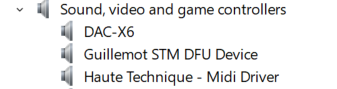
Also I want to point out that I ran Zadig as administrator.
Google ‘ does Daisy seed use guillemot DFU driver’.
It looks like this Guillemot device uses the same PCI DID/VID as DAISY SEED for DFU mode due to it being based on the STM32 and then installs it’s own drivers. Now I need remove it’s driver from my system. What a nightmare.
Okay, so now that the other DFU driver is completely removed from my system I’m able to flash the SEED again. And the SEED shows up as ‘DFU is FS mode’ in Windows Device Manager under Universal Serial Bus Drivers and NOT under Sound video and game controllers.
2 Likes