Hello, maybe somone can help me. I have two questions:
- I can’t chosse the daisy “seed” as a target board in plugdata.
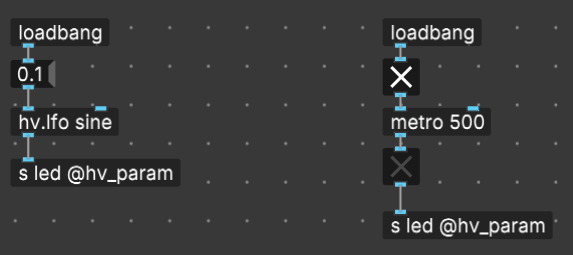
- Where can i find a documentation how to adress the outputs and inputs from a daisy board? For example i want to blink the onboard LED. Can i reach it with [s led @hv_param]? Unfourtnally it doesn’t work, but maybe it’s because i choose the “pod” as a target board to my daisy “seed”. Any ideas?
- A Seed is not a board, it’s a SoM (System on Module). Select the Pod for a basic configuration or create your own minimal json file
- At the moment the documentation is here: GitHub - electro-smith/json2daisy: Utility for converting JSON board definitions into valid, libDaisy compatible C++ board support files
You can also watch my videos on YT: https://www.youtube.com/watch?v=-li27LeH4ZY
I’m actually not sure (or can’t remember) how the onboard led is addressed. None of the default configurations have this set up, so you’d need a custom board json that connects to it.
The onboard USER led on Seed or PatchSM is accessed via the UserLed component.
1 Like
Thnx for the reminder!
Right, so you need to create a custom json that has something like:
{
    "name": "myboard",
    "som": "seed",
    "audio": {
        "channels": 2
    },
    "components": {
        "led": {
            "component": "UserLed"
        }
    }
}
And you can then send values to [s led @hv_param], but iirc we couldn’t do pwm/float values and only 0 and 1.
It’s anyway in most cases not particularly useful to address this led other than for basic testing of course.
1 Like
For instance this on the left doesn’t work, but on the right does:
(I just tested this and the left just keeps the led turned on)
1 Like