I’m having a problem with a project I’m working on. The plug data patch flashes correctly onto the daisy seed, and no errors are detected.
The only problem is that there’s no audio output (before adding the last sensors, everything was working fine).
I then noticed that a potentiometer was connected incorrectly (I had also connected the pin dedicated to GND to VCC). I corrected the connection, but it was probably burned out by then (it wasn’t showing any value on the Arduino serial monitor).
I replaced this potentiometer and individually checked each switch/potentiometer/sensor I need to use on the breadboard. Everything works fine, but when I flash the complete patch, there’s no audio, and none of the sensors do anything.
Jack inputs are connected to the audio outs, but neither of them produces audio.
An electret microphone from azdelivery is connected to the audio in (but all these components worked before, and gave feedback).
What could have happened?
Hi @QuentinM!!
Happy to troubleshoot with you 
Please feel free to share a screenshot of the patch and json file, thanks!!
I think it’ll be helpful to make a copy of this patch and start removing one thing at a time until things work.
Please don’t share a pile of screenshots like this. Should people type everything by hand to reproduce the issue? I’m not going to do it.
I recommend that you start with a basic patch with like an oscillator going to the output to confirm that your Daisy is still functional.
After that start eliminating parts of the patch to pinpoint where the problem is.
Then create a very minimal patch with just the problematic part to reproduce and confirm the issue.
Then share this completely minimized patch with the group so people can investigate it proper.
I also recommend that you spend some time to organize your patches to make them easier on the eyes 
Okay, sorry, I’ll try that in the next few days. However, I suspect it’s a problem with one of the breadboards I’m using, as the sensors connected to it are providing fluctuating values.
Of course first confirm that your setup is electrically correct.
I noticed that the problems are related to this “delay.”
If I connect a potentiometer to the first inlet, I have no problems. However, if I connect one to the second inlet (inlet width), I hear nothing. If I connect a potentiometer to the last inlet (which adjusts the feedback), I hear audio, but other controllers that adjust parameters of the main patch no longer work.
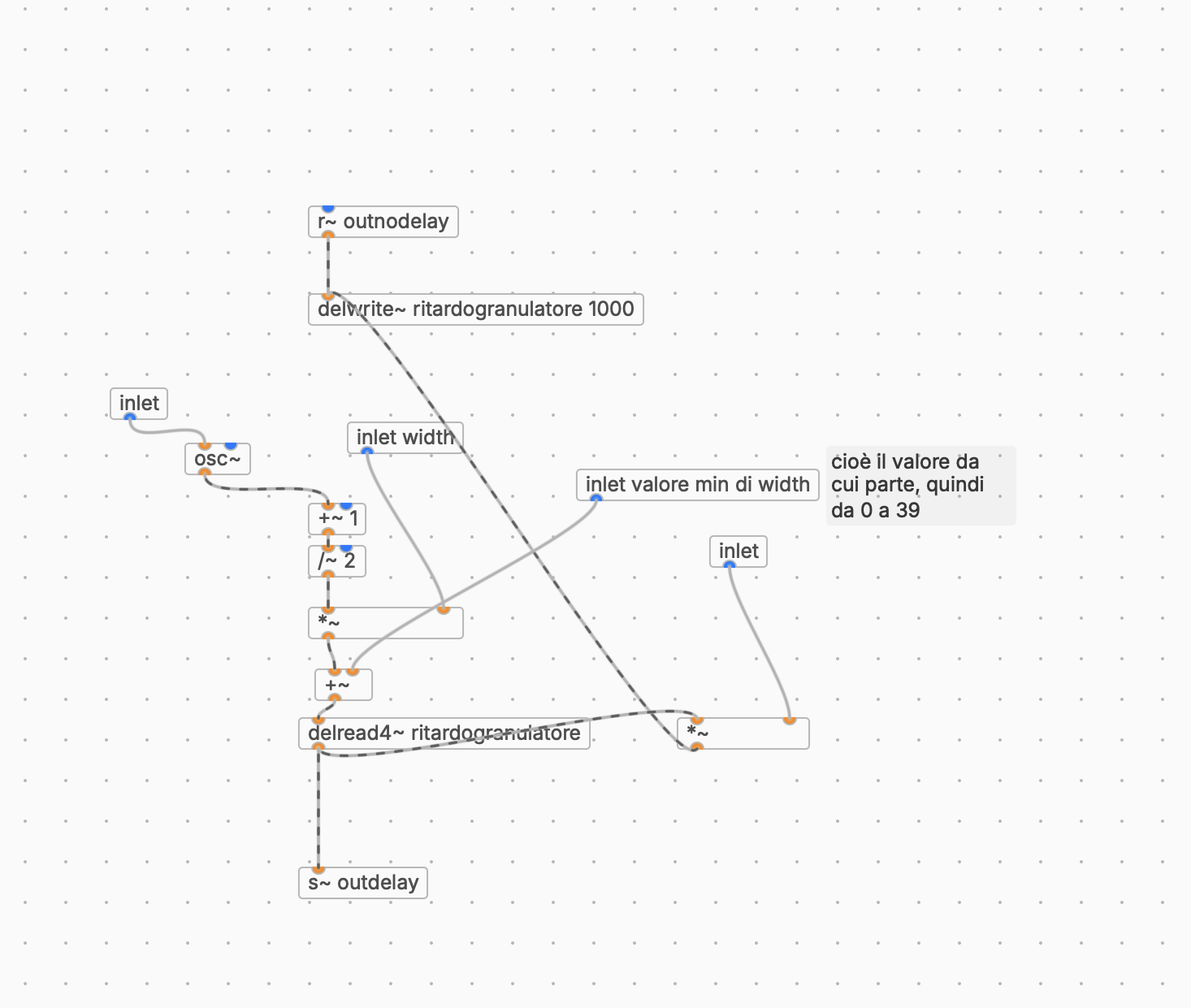
Try using signals (orange) instead of control rate messages (blue) on these objects.
Daisy potentiometers send new values once every audio block which can “reset” objects. If it’s a continuous signal (for instance using [line~]) then usually there are less issues.
Also try building with only this delay and nothing else, so you can investigate with less variables and more focus.
Thanks a lot, I also noticed that increasing the blocksize in the compiled mode menu helps. I used to have it at 2, now it’s 48 and it seems to work correctly. Does that make sense? More than anything, I’d like to understand why.
If you have it at 2 and are doing a lot of control rate calculations the CPU may not have enough time to finish everything.
That’s an important detail that you left out. Most users have the standard blocksize of 48.
yes that was the problem, now everything works correctly, thank you very much